encoder
A video encoder is a way to take a video signal from a source (such as a camera, a video switcher, or video-broadasting software) and send it to a streaming host such as YouTube, Facebook, or Vimeo.
Video encoders can be stand-alone devices, built into other equipment, or even just exist as software applications. Regardless of the type of encorder, it must have an incoming video signal to process and an internet connection in order to transmit that signal to the host of the stream.
Although several protocols exist for connecting an encoder to a streaming host, the most popular by far is RTMP. Therefore, one of the first settings to put into any encoder is the URL of the streaming host's servers. A typical example would be rtmp://a.rtmp.youtube.com/live2. The correct URL is provided by the streaming host.
The other critical setting for an encoder is the stream key. This is a string of letters and numbers which tells the server not only who you are, but which specific stream this might be. It is possible for a single account to have multiple streams, therefore each stream needs its own key. Some hosts provide streaming keys on a per-event basis, but most give the option of a "permanent key" which remains the same.
Once it is running, the encoder maintains a continuous connection to the host. If the connection is broken (say by faulty internet), they will typically try to reconnect automatically, but if the connection continues to be broken many hosts (like YouTube) will interpret this as the end of the broadcast and close the streaming event.
Because encoders require a continous connection to the host, they must have enough bandwidth to support the stream. Many (but not all) encoders and hosts are capable of dynamically adjusting the bitrate of the connection to adjust for different amounts of bandwidth, but when setting up an encoder is it important to test your bandwith and configure the encoder accordingly.
Common Encoders Used in Churches
OBS (Open Broadcast Software)
OBS is a free software package that runs on a laptop or desktop computer and allows you to combine multiple video or media sources into a single video signal and then either record or stream that signal. It has a built-in encoder that can connect to a single streaming host at a time, however there are plug-ins available that make it possible to connect to multiple streaming hosts at once (for example, in order to stream to both YouTube and Facebook). You can configure the OBS encoder by going to Settings > Stream. Note that OBS has presets for common streaming hosts as well as option to custom settings. Under Settings > Output > Streaming there are more options for setting the bitrate and various parameters of how the enconding is done.
ATEM Mini Pro
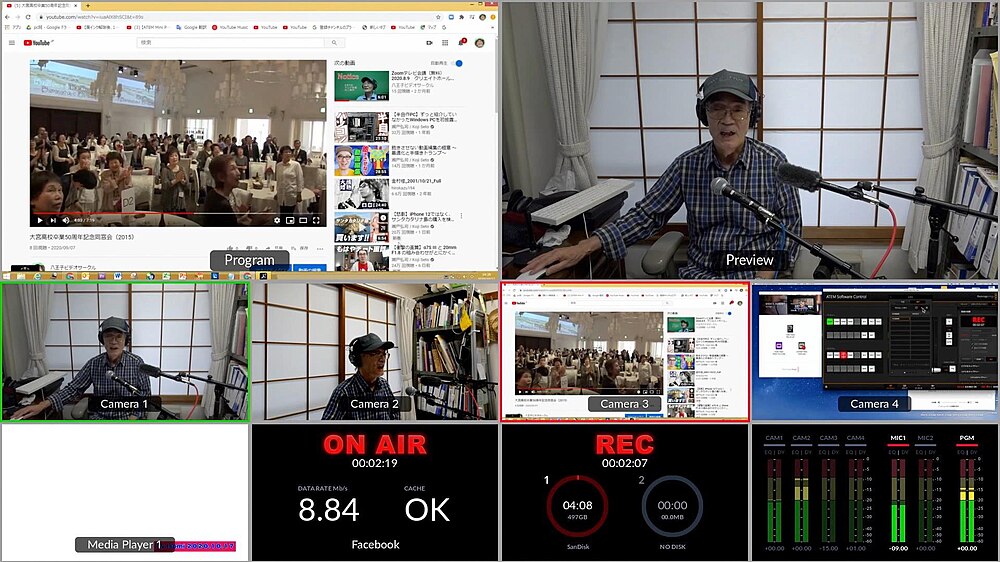 The ATEM Mini is a popular hardware-based video switcher. The "Pro", "ISO," and "Extreme" versions of the device include a built-in encoder which must be configured using the included ATEM software. However, once configured it is possible to stream straight from the ATEM without needing a computer at all.
Zoom
The video conferencing platform Zoom has the capability of sending a video signal from your meeting to a streaming host. This must be enabled and configured via the settings, but in this case the encoder actually operates on Zoom's servers and therefore doesn't take any extra bandwidth from the people connected to the call. Zoom supports streaming to YouTube, Facebook, or a custom RMTP server you specify. There are also options about how the video signal is composed, for example is it always all the speakers (like a "gallery" mode) or is the focus on just whomever is speaking ("speaker mode").
Web Browser
Both Facebook and YouTube can use certain web browsers (such as Chrome and Edge, but not Safari) as encoders. The computer must have an available video signal (such as from a webcam or OBS running in "virtual camera" mode), and you will be prompted to allow the website to access it. This approach has the advantage of being quite simple.